MQTT 5 features#
MQTT.fx supports both MQTT 3.1.1 and MQTT 5.0 (and legacy MQTT 3.1). The protocol version is chosen per connection profile. When you connect with MQTT 5.0, additional session options, subscription options, and message properties become available. This chapter describes the MQTT 5 specific features MQTT.fx exposes; the MQTT 5 advanced options were added in MQTT.fx 5.9.0.
Choosing MQTT 5 for a connection#
In the profile's general options, MQTT.fx connects with MQTT 5.0 by default (Use Default is on, and the default version is 5.0). To pin a version, clear Use Default and select 3.1, 3.1.1, or 5.0. See Connection profiles → MQTT version.
When connected, the connection bar shows an MQTT 5 (or MQTT 3) badge so you can confirm which protocol is in use.
The MQTT 5 controls on the Subscribe and Publish tabs are enabled only on an MQTT 5 connection; on MQTT 3 they are disabled.
Sessions: Clean Start and Session Expiry#
MQTT 3 uses a single Clean Session flag. MQTT 5 replaces it with two settings:
- Clean Start — whether to start with a fresh session (discarding any session state the broker still holds), default off.
- Session Expiry Interval — how long, in seconds, the broker keeps your session after you disconnect.
0(the default) means the session ends immediately on disconnect. A larger value lets you reconnect and resume the session (queued messages, subscriptions) within that window.
Set these in the profile's general options. The session-expiry field is only active on MQTT 5 connections.
Subscription options#
On the Subscribe tab, an MQTT 5 connection adds three per-subscription options (see also Publish and subscribe):
No Local#
Tells the broker not to send you back messages that you yourself published on the subscribed topic. Useful when a single client both publishes and subscribes to the same topic and you do not want to receive your own messages.
Retain As Published#
Controls whether the retained flag is preserved on messages forwarded to you. With it enabled, a message that was published as retained still arrives marked retained; otherwise the flag is cleared on delivery.
Retain Handling#
Controls whether the broker sends existing retained messages when you subscribe:
| Option | Behavior |
|---|---|
| Send at subscription time | Always deliver retained messages on subscribe (default) |
| Send at subscription time, only for new subscriptions | Deliver retained messages only if this subscription did not already exist |
| Do not send at subscription time | Never deliver retained messages on subscribe |
MQTT 5 message properties#
MQTT 5 messages can carry metadata beyond the payload. When you select a received MQTT 5 message (on the Subscribe tab or in the Namespace Explorer), MQTT.fx shows its properties:
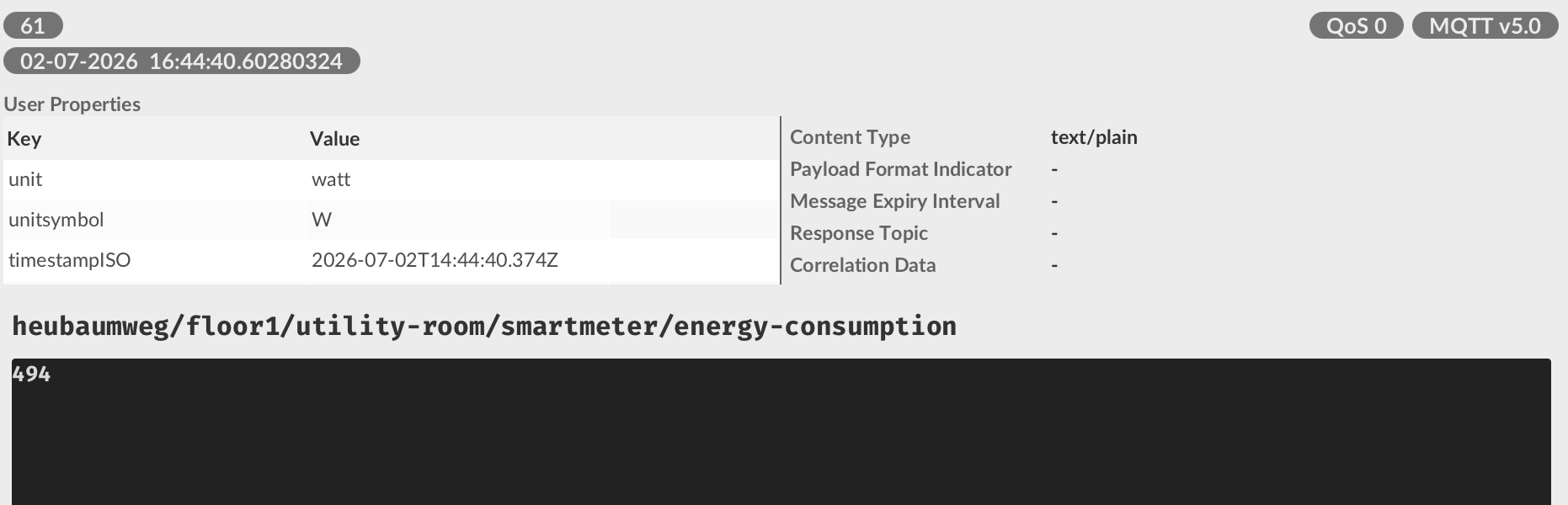
- Content Type — a MIME-type hint for the payload (MQTT.fx can use it to pick a matching payload decoder).
- Response Topic — the topic a responder should reply on (request/response).
- Correlation Data — an identifier tying a response back to its request.
- Payload Format Indicator — whether the payload is UTF-8 text or unspecified bytes.
- Message Expiry Interval — how long the message remains valid.
- User Properties — arbitrary name/value pairs set by the publisher.
Request/response helpers#
For MQTT 5 messages that carry a response topic or correlation data, a right-click menu on the message lets you:
- Copy Correlation Data
- Copy Response Topic
- Subscribe to Response Topic — subscribe directly to the message's response topic, which is handy when testing request/response flows.
Publishing with MQTT 5 properties#
On an MQTT 5 connection, the Publish tab lets you attach properties to the message you send:
- User Properties — name/value pairs you add in a small table.
- Content Type — defaults to plain text if left blank.
- Payload Format Indicator — defaults to UTF-8.
- Message Expiry Interval — in seconds.
- Response Topic — the topic a responder should reply on.
- Correlation Data — ties a response back to its request.